

Assetto Corsa folder path
If you are having problems with mod installation, or Custom shaders patch not being detected, it could be caused by different Assetto Corsa installation folders configured in Content Manager/WSS app.
1) Check real Assetto Corsa installation path
Section titled “1) Check real Assetto Corsa installation path”To see where your original Assetto Corsa is installed it is best to check it from Steam. To do that:
- open Steam,
- go to your game library, find Assetto Corsa in the list,
- right-click ‘Properties’,
- select ‘Installed files’ tab
- and click ‘Browse’:
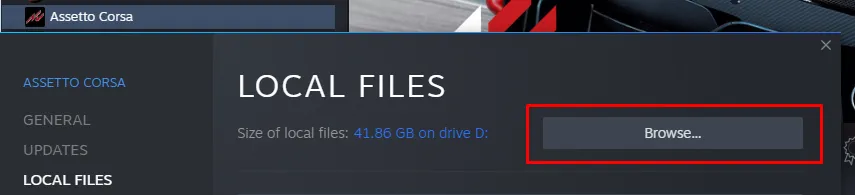
Wherever explorer is opened - this is your actual path to Assetto Corsa installation. You can click address bar in Windows explorer and copy it or just note it.
2) WSS App Assetto Corsa installation folder
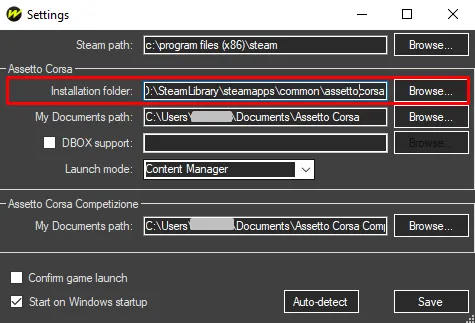
Section titled “2) WSS App Assetto Corsa installation folder”- Open WSS app (can find near your clock in bottom-right and double-click)
- open menu (arrow down icon near the button)
- click Settings
- paste or select installation path in the Assetto Corsa > Installation folder field
3) Content Manager Assetto Corsa installation folder
Section titled “3) Content Manager Assetto Corsa installation folder”And the same for Content Manager:
- Open Content Manager
- go to Settings > Content Manager > General
- and change Assetto Corsa folder setting to be same as one found in step 1):
